Introduction
Docker containers, actually, are not Sandbox applications, which means they are not recommended to run random applications on the system as root with Docker. You should always treat a container running a service/process as a service/process running on the host system, and put all the security measures inside the container you put on the host system.
We saw in Chapter 1, Introduction and Installation , how Docker uses namespaces for isolation. The six namespaces that Docker uses are Process, Network, Mount, Hostname, Shared Memory, and User. Not everything in Linux is namespaced, for example, SELinux, Cgroups, Devices ( /dev/mem , /dev/sd* ), and Kernel Modules. Filesystems under /sys , /proc/sys , /proc/sysrq-trigger , /proc/irq , and /proc/bus are also not namespaced, but they are mounted as read-only by default with the containerD container runtime.
To make Docker a secure environment, a lot of work has been done in the recent past, and more work is underway.
- As Docker images are the basic building block, it is very important that we choose the right base image to start with. Docker has this concept of official images, which are maintained by either Docker, the vendor, or someone else. If you recall from Chapter 2, Working with Docker Containers , we can search images on Docker Hub using the following syntax:
$ docker search <image name>For example, consider the following command:
$ docker search ubuntu
We will see a column, OFFICIAL , and if the images are official, you will see [OK] against that image in that column. There is a feature in Docker that does Digital Signal Verification of official images after pulling them. If the image is tampered, be will be notified but will not be prevent the user from running it.
NOTE
More details about official images can be found at https://github.com/docker-library/official-images.
-
In Chapter 6, Docker APIs and SDK s, we saw how we can secure a Docker remote API, when Docker daemon access is configured over TCP.
-
We can also consider turning off the default inter-container communication over the network with
--icc=falseon the Docker host; though containers can still communicate through links, which overrides the default DROP policy of iptables, they get set with the--icc=falseoption. -
We can also set Cgroups resource restrictions, through which we can prevent Denial of Service ( DoS ) attacks through system resource constraints.
-
Docker takes advantage of the special device, Cgroups, that allows us to specify which device nodes can be used within the container. It blocks processes from creating and using device nodes that could be used to attack the host.
-
Any device node pre-created on the image cannot be used to talk to the kernel because images are mounted with the nodev option.
The following are some guidelines (they may not be complete) you can follow to achieve a secure Docker environment:
-
Run services as non-root and treat the root in the container, as well as outside the container, as root.
-
Use images from trusted parties to run the container; avoid using the
-insecure-registry=[]option. -
Don’t run the random container from the Docker registry or anywhere else.
-
Have your host kernel up to date.
-
Avoid using —privileged whenever possible, and drop container privileges as soon as possible.
-
Configure Mandatory Access Control ( MAC ) through SELinux or AppArmor.
-
Collect logs for auditing.
-
Do regular auditing.
-
Run containers on hosts, which are specially designed to run containers. Consider using Project Atomic, CoreOS, or similar solutions.
-
Mount devices with the
--deviceoption rather than using the--privilegedoption to use devices inside the container. -
Prohibit SUID and SGID inside the container.
Docker and the Center of Internet Security (http://www.cisecurity.org/) released a best practices guide for Docker security, which covers most of the preceding and more guidelines at https://blog.docker.com/2015/05/understanding-docker-security-and-best-practices/.
In Chapter 1, Introduction and Installation , we described how to install Docker on CentOS 7.5. Let’s use that default installation to try an experiment:
- Disable SELinux using the following command:
$ sudo setenforce 0- Create a user and add it to the default Docker group so that the user can run docker commands without
sudo:
$ sudo useradd dockertest
$ sudo passwd dockertest
$ sudo groupadd docker
$ sudo gpasswd -a dockertest docker- Log in using the user we created earlier, and start a container as follows:
$ su - dockertest
$ docker container run -it -v /:/host alpine ash- From the container,
chrootto/hostand run the shutdown command:
$ chroot /host
$ shutdown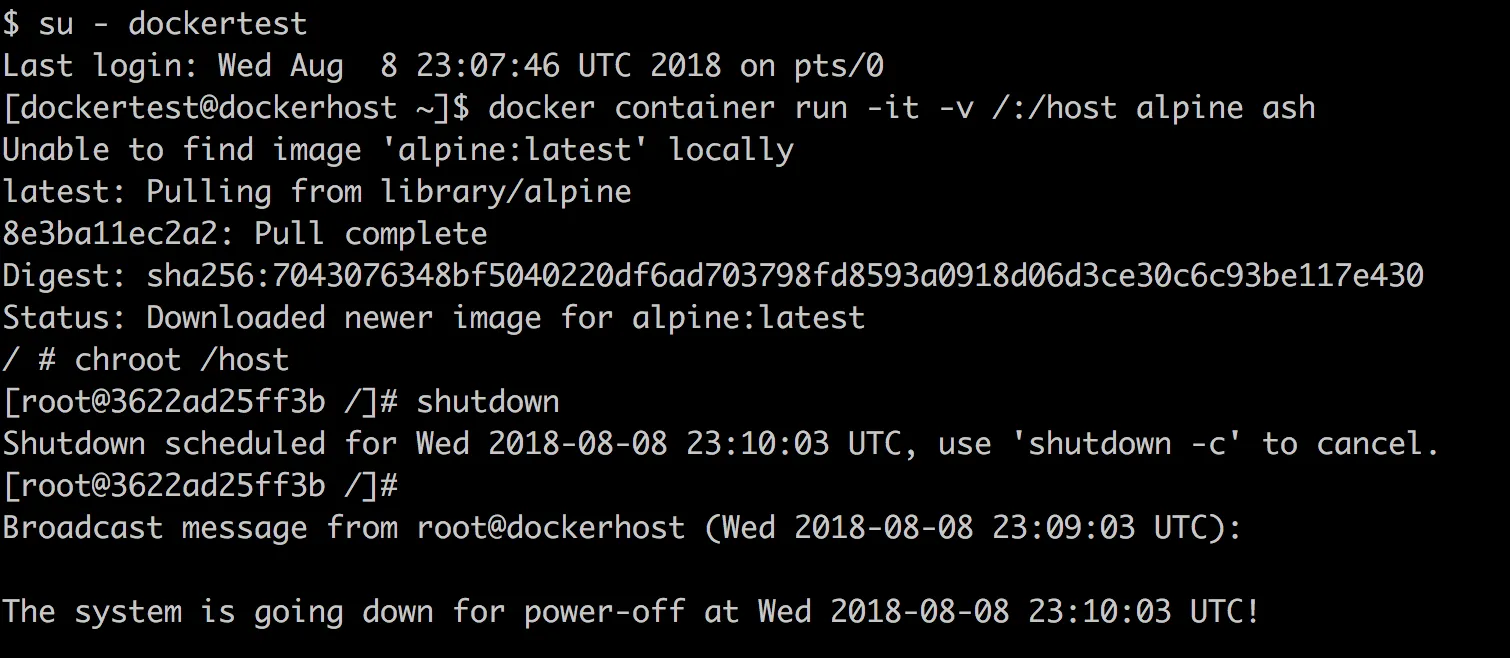
As we can see, a user in a Docker group can shut down the host system. Docker currently does not have authorization control, so if you can communicate to the Docker socket, you are allowed to run any Docker command. It is similar to /etc/sudoers :
USERNAME ALL=(ALL) NOPASSWD: ALL
This is really not good. Let’s see how we can guard against this and more in the rest of the chapter.