Looking At The Container Logs
If the container emits logs or output on STDOUT / STDERR , then we can get them without logging into the container.
Getting ready
Ensure that the Docker daemon is running on the host and can be connected through the Docker client. You will also need a running container, that emits logs/output on STDOUT .
How to do it…
To get logs from the container, run the following command:
docker container logs [OPTIONS] CONTAINEROr run the following legacy command:
docker logs [OPTIONS] CONTAINERLet’s take an example from the earlier section where we ran a daemonized container and looked at the logs:
$ docker container run -d  ubuntu \
           /bin/bash -c  \
           "while [ true ]; do date; sleep 1; done"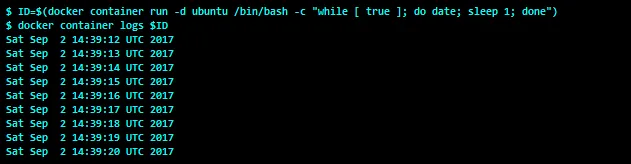
How it works…
Docker will look at the container’s specific log file from /var/lib/docker/containers/<Container ID>/<Container ID>-json.log and show the results.
There’s more…
With the -t option, we can get the timestamp with each log line, and with -f we can get tail-like behavior.
See also
Look at the help option of docker container logs :
$ docker container logs --helpThe documentation on the Docker website can be found here: https://docs.docker.com/engine/reference/commandline/container_logs/.